Entity Search Picker
Overview
The Entity Search Picker is a highly configurable tool designed to facilitate the selection of entities within the platform. This picker allows users to select one or more entities based on configurable criteria, making it a versatile component in various applications. This documentation outlines the configuration options, functionality, and internal workings of the Entity Picker, to assist developers and template editors in implementing and utilizing the tool effectively.
The root configuration to use is the following:
entitySearchPicker:
  title: Entity Search Picker
  ui:field: EntitySearchPicker
  ui:options:
    entities:
      # the list of Entity Providers goes here
Under ui:options, you define the entities property: a list of objects used to configure the Entity Providers, i.e. the providers used to fetch the different kinds of entities that can be queried by the user. See Entity Providers below for the full list of available providers and their configuration.
Common Configuration
The following options are shared across all Entity Providers. Provider-specific options and caveats are documented in each provider's own section under Entity Providers.
Selection mode
Defined at the ui:options level (not inside a single entity provider), it toggles between single and multiple selection:
ui:options:
  multiSelection: true # or false
  entities:
    # ...
-
Single Selection (
multiSelection: false): The picker returns thereturnFieldof a single selected entity.
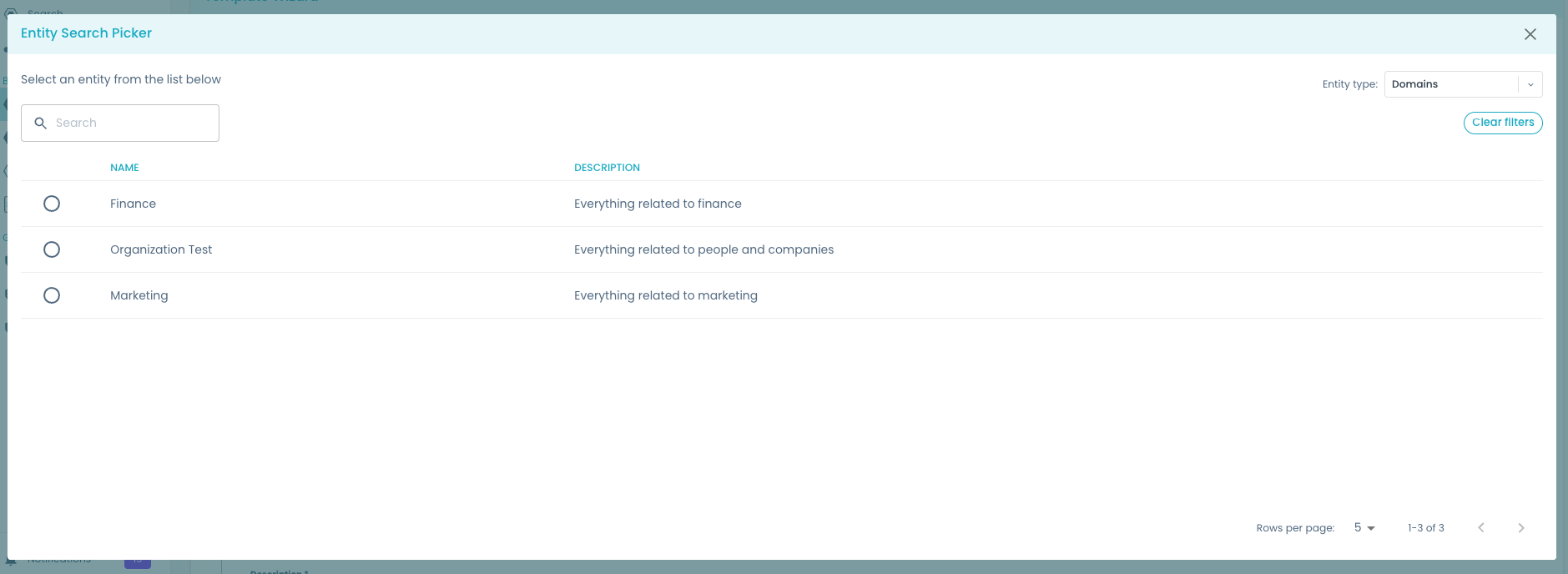
-
Multiple Selection (
multiSelection: true): The picker allows the selection of multiple entities, returning a list of values.
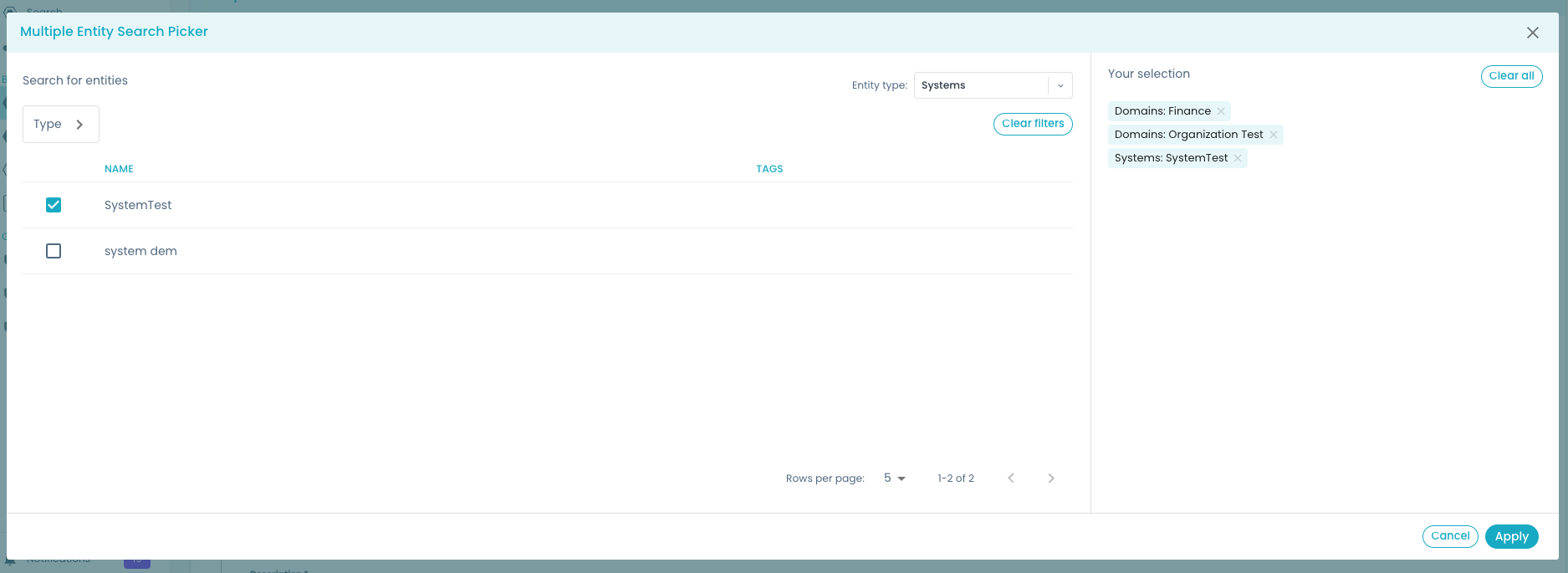
It's possible to return the entity ref or full entity object, instead of URN, by changing the returnField in the configuration (see Return field).
It is also possible to define the boolean field ui:allowArbitraryValues that, if set to false, prevents the users from typing arbitrary values outside the list of selectable items. This specifies if the field can be edited manually by the user. If omitted, by default it will be false (not editable by the user).
Display name
A string that defines the label shown as a prefix when an entity is selected and it's used as the name on the entity kind selector (pluralized), inside the dialog window. The entity kind is used as a fallback. For example:
displayName: Consumables

Display field
It defines which property is shown for the selected entities. This property is processed as a Nunjucks value, so it can contain variables and expressions. It represents which label is shown for selected entities.
displayField: '{{spec.mesh.name}}'
When not defined, the field entity.spec.mesh.name is used, and in case it is not defined, the fallback value is entity.metadata.name or name for Consumable Provider. Provider-specific defaults are called out in each provider's section.
Anywhere the EntitySearchPicker evaluates a Nunjucks expression — displayField, columns[].path, Data Contract's filter.system, Business Concept's conceptSchemeFilter/conceptFilter — you can use either the standard {{ ... }} syntax or the scaffolder-style ${{ ... }} syntax interchangeably; both are normalized internally and resolve identically:
displayField: '{{spec.mesh.name}}' # standard syntax
# or
displayField: '${{spec.mesh.name}}' # scaffolder-style syntax
Return field
With this configuration, it is possible to choose which value is returned for the selected entities. The values accepted depend on the Entity Provider; see each provider's section for what it supports and its full output shape.
- urn: the Witboost global URN (this is the default value for most providers)
e.g.:
urn:dmb:dmn:finance - ref: entity reference used inside the Builder module
e.g.:
domain:default/finance - full: all properties of the object (shape varies by provider — see each provider's Output sub-section)
- iri: (Business Concept only) the concept IRI as a string
For Consumable and Data Contract entity types, you cannot return an entity reference, because it does not exist. If ref is selected, the Witboost global URN will be given.
The Business Concept entity type does not support urn or ref at all — using either throws an error at initialization. Use iri (the default) or full. See Business Concept for details.
Filters usable by end users
These are the filters that end users can apply to refine their selection within the user interface, configured via userFilters. The template developer can choose which filters to make available to end users. Common filters include:
- search: filter elements matching with
spec.mesh.name,metadata.nameorname; this filter is available to all the Entity Providers.
- domain: filter elements matching the
domainproperty; this filter is available to System and Consumable Entity Providers.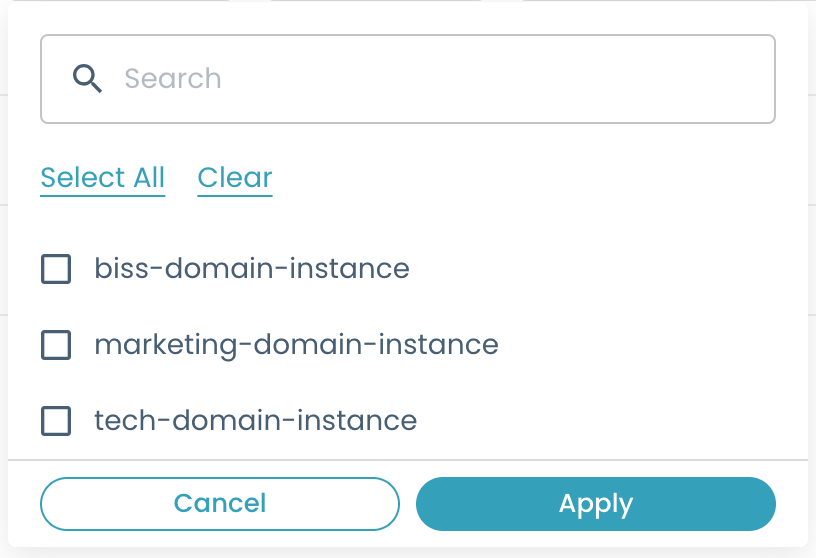
- type: filter elements matching the
typeproperty; this filter is available only to System Entity Provider.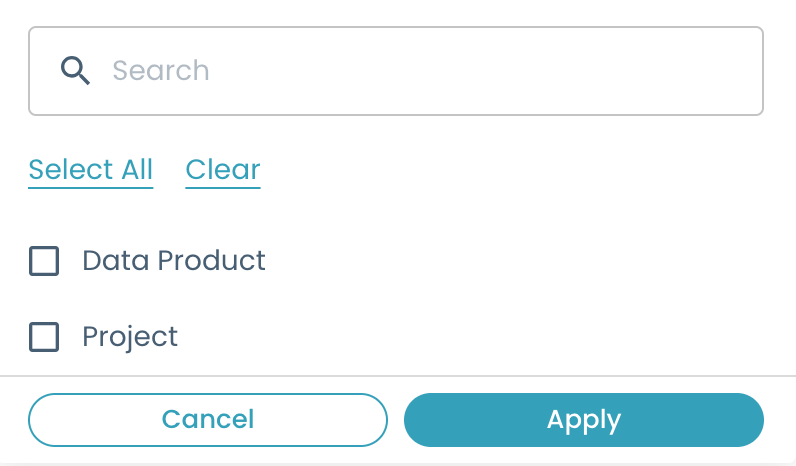
- system: filter elements matching the selected system URN property; this filter is available only to Consumable and Data Contract Entity Providers.
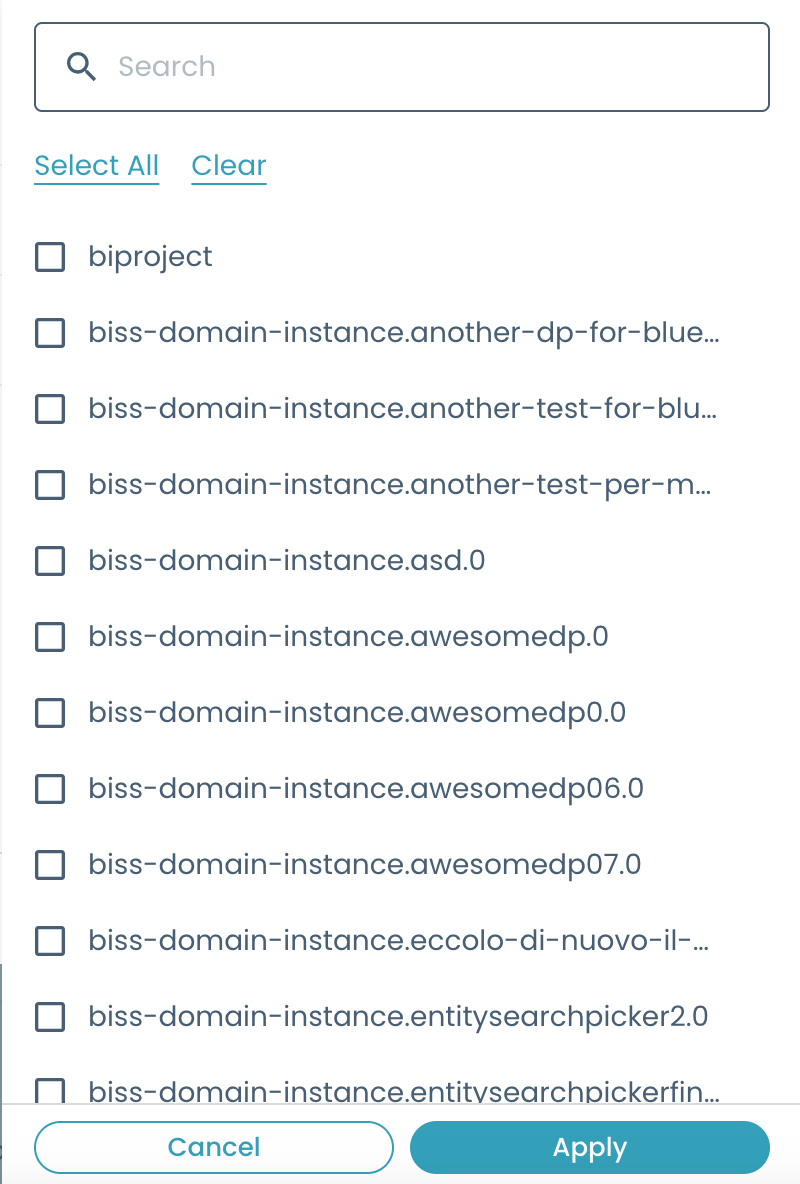
- environment: filter elements matching the
environmentproperty; this filter is available only to Consumable Entity Provider.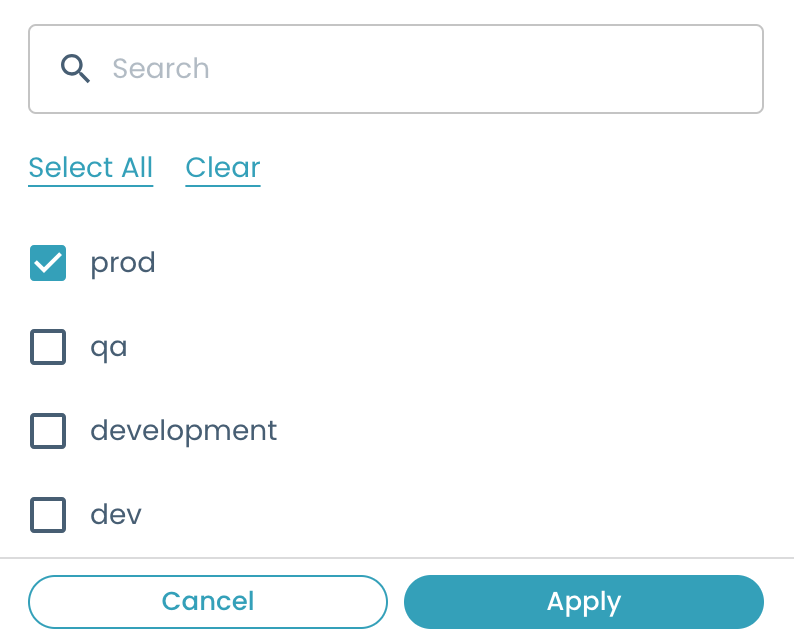
By default, no filters are shown, if not specified.
Which userFilters values are accepted depends on the Entity Provider; see each provider's section for the exact list.
Pre-filtering
Usually, you would like to limit the values that the user can select before they even open the picker. This is done by defining a filter object under the entity configuration:
filter:
  practiceShaper:
    kind: ${PRE_FILTER} # the value depends on the selected Entity Provider
Every entity type has its own filter options, fully documented in each provider's Configuration sub-section below (see Domain, System, Consumable, Data Contract and Business Concept). Resource and Remote do not support pre-filtering.
Displayable columns in the selection table
Template developers can choose to display a set of columns in the entity selection table. This customization enhances the user's ability to view pertinent information. You can show any number of additional columns by referencing fields of the selected entity (even using Nunjucks to perform transformations).
To define the additional columns, you can leverage the following configuration fields:
nameto define the column name displayed in the table;pathto define which value to show. It's a Nunjucks template, rendered against the entity object as it would be returned byreturnField: fullfor that Entity Provider (see Return field for the exact shape). It is important to enforce the string type for this field inside the yaml by using the single quotes as shown to avoid errors;valuethat can be used as an alternative topathto choose among two default values:nameanddescription. These are shortcuts for the most common fields to display.
Since the full shape differs per Entity Provider, so does what you can put in path:
- Domain / System / Resource / Data Contract: the entity is a catalog entity, so
pathnavigatesmetadata,spec, etc., e.g.{{spec.mesh.name}},{{metadata.name}}. - Consumable: the entity is a flat object, so
pathnavigates its top-level fields directly, e.g.{{name}},{{domain}},{{specific.bucket}}(nometadata/specwrapper). - Business Concept: the entity is
{ id, type, properties }, sopathreads{{id}},{{type}}, or{{properties['skos:prefLabel']}}.propertiesis not the full set of RDF properties of the concept: it only contains the predicates you explicitly requested viacolumns(plusskos:prefLabel, always included) — see Business Concept for details and the shorthand syntax. - Remote: columns are generated dynamically from the API response and can reference any top-level field returned by the external API.
Example:
columns:
  - name: name
    path: '{% if spec.mesh.name %}{{spec.mesh.name}}{% else %}{{metadata.name}}{% endif %}'
  - name: description
    value: description
  - name: owner
    path: '{{spec.owner}}'
  - name: tags
    path: '{% for tag in spec.mesh.tags %}{{tag.tagFQN}}{{', ' if not loop.last }}{% endfor %}'
Witty Autocomplete
You can enable AI-powered suggestions in the EntitySearchPicker by setting wittySuggestions.enabled = true:
ui:options:
  wittySuggestions:
    enabled: true
  entities:
    # ...
This is a cross-cutting feature that works at the EntitySearchPicker level, so it is compatible with all Entity Providers (Domain, System, Resource, Consumable, Data Contract, Business Concept and Remote).
For a full example and more details, see the Witty Autocomplete Agent.
Entity Providers
The Entity Provider is a component used by the EntitySearchPicker that is responsible for fetching, filtering and rendering all the data of entities of a specific kind. The generic configuration you can use to define an Entity Provider is the following:
multiSelection: true # see "Selection Mode" section
kind: ${ENTITY_KIND} # the kind of data the Entity Provider is handling
displayField: ${OBJECT_PROPERTY} # the property of the object to show in the EntitySearchPicker after a selection
returnField: ${RETURNING_FIELD} # "urn", "ref", "full" or "iri", it corresponds to the value to be saved in the final catalog-info.yaml file
userFilters: ${FILTERS_LIST} # a list of filters that can be used in the EntitySearchPicker to filter values
filter:
  practiceShaper:
    kind: ${PRE_FILTER} # it contains a string value used to pre-filter data before rendering the EntitySearchPicker. This value depends on the selected Entity Provider
columns: # a list of objects describing the columns to display in the table
The picker can be configured to allow the selection of these entities by default:
It is possible to choose your entities under the ui:options parameter with the entities attribute. There you can set more than one entity type, and for each one, you can define a specific configuration.
Domain
Overview
Selects domain instance entities (kind: Domain) from the catalog.
Configuration
You can refine what set of domains the user can choose from with the filter.practiceShaper pre-filter:
| Option | Type | Description |
|---|---|---|
| kind | string | One of: |
| - compatibleWithType - See below. | ||
| - instanceOf - See below. | ||
- compatibleWithCurrentTemplate - Takes the SystemType/ComponentType reference, which is the target of the generates relation of the current creation template, and applies the same logic of compatibleWithType. | ||
| compatibleWithType | string[] | (Required when kind is compatibleWithType) Accepts the reference of a Practice Shaper entity type (e.g., SystemType, ComponentType). Filters domain instances whose DomainType (spec.instanceOf property) is the parent domain (directly or transitively) of the provided type. |
| instanceOf | string[] | (Required when kind is instanceOf) Reference of a DomainType in the Practice Shaper. Filters domain instances that are instances of the provided type. |
Supported userFilters: search.
Examples:
-
compatibleWithCurrentTemplatepre-filter:Let's imagine the
DomainEntity Provider is used in a template that generates an Output Port (generates: componenttype:default/outputport). If no pre-filter is present or only thecompatibleWithCurrentTemplatepre-fillter is set, the end user will see only the domain the Output Port is binded to, or, if no domain is found for that Output Port, it will be showed only the domain binded to the Output Port's system.The pre-filter to set will be the following:
filter:practiceShaper:kind: compatibleWithCurrentTemplate -
compatibleWithTypepre-filter:If you want to specify a
ComponentTypeorSystemTypethe domain must be binded to, you can do it by using the following configuration:filter:practiceShaper:kind: compatibleWithTypecompatibleWithType:- componenttype:default/outputport- systemtype:default/projectIn this way, there will be shown only the domain instances binded to the 'Output Port' component type and 'Project' system type.
-
instanceOfpre-filter:If you want to specify a list of
DomainTypes to be instantiated by domain instances, you can do it with the following configuration:filter:practiceShaper:kind: instanceOfinstanceOf:- domaintype:default/department- domaintype:default/business-domain
Output
returnField supports urn (default), ref and full. The full shape is a catalog entity:
{
  "apiVersion": "backstage.io/v1alpha1",
  "kind": "Domain",
  "metadata": {
    "name": "finance",
    "description": " Everything related to finance",
    "links": [
      {
        "url": "http://example.com/domain/finance",
        "title": "Finance Domain"
      }
    ]
  },
  "spec": {
    "owner": "group:datameshplatform",
    "mesh": {
      "name": "Finance"
    }
  }
}
Example
domain:
  title: Domain
  type: string
  description: The Domain of the Data Product.
  ui:field: EntitySearchPicker
  ui:options:
    multiSelection: false
    entities:
      - type: Domain
        displayName: Domain
        displayField: '{{spec.mesh.name}}'
        returnField: ref
        userFilters:
          - search
        filter:
          practiceShaper:
            kind: compatibleWithType
            compatibleWithType:
              - systemtype:default/dataproduct
        columns:
          - name: name
            path: '{{metadata.name}}'
          - name: description
            value: description
System
Overview
Selects system instance entities (kind: System) from the catalog.
Configuration
You can refine what set of systems the user can choose from with the filter.practiceShaper pre-filter:
| Option | Type | Description |
|---|---|---|
| kind | string | One of: |
| canBeParentOfType - See below. | ||
| instanceOf - See below. | ||
canBeParentOfCurrentInstance (Default) - Takes the ComponentType reference, target of the generates relation of the current creation template, and applies the same logic of canBeParentOfType. | ||
| canBeParentOfType | string[] | Accepts the reference of a ComponentType. Filters system instances whose SystemType (spec.instanceOf property) is the target of a partOf relation having as a source the provided ComponentType. |
| instanceOf | string[] | Reference of a SystemType in the Practice Shaper. Filters system instances that are instances of the provided type. |
Supported userFilters: search, domain, type.
Examples:
-
canBeParentOfCurrentInstancepre-filter:Let's imagine the
SystemEntity Provider is used in a template that generates an Output Port (generates: componenttype:default/outputport). If no pre-filter is present or just thecanBeParentOfCurrentInstancepre-filter is set, the end user will see only the system the Output Port is binded to.filter:practiceShaper:kind: canBeParentOfCurrentInstance -
canBeParentOfTypepre-filter:If you want to specify a
ComponentTypethe system must be binded to, you can do it by using the following configuration:filter:practiceShaper:kind: canBeParentOfTypecanBeParentOfType:- componenttype:default/project-component -
instanceOfpre-filter:If you want to specify a list of
SystemTypes the systems must be instance of, you can do it with the following configuration:filter:practiceShaper:kind: instanceOfinstanceOf:- systemtype:default/dataproduct
Output
returnField supports urn (default), ref and full. The full shape is a catalog entity (same shape as Domain).
Example
dataproduct:
title: Data Product
description: Data Product
ui:field: EntitySearchPicker
ui:options:
multiSelection: false
entities:
- type: System
displayField: '{{spec.mesh.name}}'
returnField: ref
filter:
  practiceShaper:
    kind: instanceOf
    instanceOf:
      - systemtype:default/dataproduct
userFilters:
- search
- domain
- type
columns:
- name: name
path: '{{spec.mesh.name}}'
- name: owner
path: '{{spec.owner}}'
Resource
Overview
Selects resource entities (kind: Resource) from the catalog. This is the simplest Entity Provider — it does not support pre-filtering.
Configuration
No provider-specific pre-filter options are available for Resource.
Supported userFilters: search.
Output
returnField supports urn (default), ref and full. The full shape is a catalog entity (same shape as Domain).
Example
resource:
title: Entity Search Picker
description: single resource search
ui:field: EntitySearchPicker
ui:options:
multiSelection: false
entities:
- type: Resource
displayName: Resource
displayField: '{{spec.mesh.name}}'
returnField: urn
userFilters:
- search
columns:
- name: name
path: '{{metadata.name}}'
Consumable
Overview
Selects consumable components and subcomponents (kind: Consumable), i.e. marketplace entities that can be read from.
Configuration
You can refine what set of components the user can choose from with the filter.practiceShaper pre-filter:
| Option | Type | Description |
|---|---|---|
| kind | string | One of: |
| canBeReadFrom - See below. | ||
canBeReadFromCurrentInstance (Default) - Takes the ComponentType reference, target of the generates relation of the current creation template, and applies the same logic of canBeReadFrom | ||
| canBeReadFrom | string | Accepts the reference of a ComponentType. Filters consumable components and subcomponents whose type is one among the resource types readable from the provided component type, based on the Practice Shaper. |
Supported userFilters: search, domain, system, environment.
Example:
-
canBeReadFromCurrentInstancepre-filter:Let's imagine the
ConsumableEntity Provider is used in a template that generates an Output Port (generates: componenttype:default/outputport). If no pre-filter is present or just thecanBeReadFromCurrentInstancepre-fillter is set, you will see only the components/sub-components instances the Output Port can read from.filter:practiceShaper:kind: canBeReadFromCurrentInstance -
canBeReadFrompre-filter:If you want to specify a
ComponentTypefrom which component instances can read, you can do it by using the following configuration:filter:practiceShaper:kind: canBeReadFromcanBeReadFrom: componenttype:default/outputportIn the above example, the
componenttype:default/outputportreads from two other ComponentTypes:componenttype:default/workloadandcomponenttype:default/storage. Consequently, you will see in the EntitySearchPicker only the components that are instances of the before-mentioned types and that are consumable too.
Output
returnField supports urn (default) and full.
You cannot return an entity reference for Consumables, because it does not exist. If ref is selected, the Witboost global URN will be given.
The full shape is a flat marketplace object (no metadata/spec wrapper), e.g.:
{
"_computedInfo": {
"urn": "urn:dmb:cmp:sub-domain-a:dpwithimpala:0:s3-cdp-output-portasdasd-6",
"domain": {
"id": "urn:dmb:dmn:subdomaina",
"name": "sub-domain-A"
},
"system": {
"id": "urn:dmb:dp:sub-domain-a:dpwithimpala:0",
"name": "DPWithImpala"
}
},
"id": "urn:dmb:cmp:sub-domain-a:dpwithimpala:0:s3-cdp-output-portasdasd-6",
"kind": "outputport",
"name": "S3 CDP Output Portasdasd 6",
"tags": [],
"text": "",
"title": "S3 CDP Output Portasdasd 6",
"domain": "sub-domain-A",
"version": "0.0.0",
"location": "urn:dmb:cmp:sub-domain-a:dpwithimpala:0:s3-cdp-output-portasdasd-6",
"platform": "CDP on AWS",
"specific": {
"acl": {
"users": [],
"owners": []
},
"bucket": "asdasd",
"folder": "asdasd",
"cdpEnvironment": "asdasd"
},
"dependsOn": [],
"startDate": "2023-09-28T11:02:24.233Z",
"documentId": "urn:dmb:cmp:sub-domain-a:dpwithimpala:0:s3-cdp-output-portasdasd-6:dev",
"sampleData": {},
"technology": "S3",
"description": "asdasd",
"environment": "dev",
"creationDate": "2023-09-28T11:02:24.233Z",
"dataContract": {
"SLA": {
"upTime": null,
"timeliness": null,
"intervalOfChange": null
},
"schema": [],
"endpoint": null,
"termsAndConditions": null
},
"outputPortType": "Files",
"semanticLinking": [],
"deploymentUnitId": "urn:dmb:dp:sub-domain-a:dpwithimpala:0",
"useCaseTemplateId": "urn:dmb:utm:aws-cdp-outputport-s3-template:0.0.0",
"fullyQualifiedName": null,
"processDescription": null,
"dataSharingAgreements": {
"billing": null,
"purpose": null,
"security": null,
"lifeCycle": null,
"limitations": null,
"intendedUsage": null,
"confidentiality": null
},
"infrastructureTemplateId": "urn:dmb:itm:aws-cdp-outputport-s3-provisioner:0"
}
When not defined, displayField falls back to name for Consumable (instead of spec.mesh.name/metadata.name used by catalog-based providers).
Example
readsFrom:
title: Reads from
type: array
ui:field: EntitySearchPicker
ui:options:
multiSelection: true
entities:
- type: Consumable
displayField: '{{name}}'
returnField: urn
filter:
practiceShaper:
kind: canBeReadFrom
canBeReadFrom: componenttype:default/workload
userFilters:
- search
- domain
- system
- environment
columns:
- name: name
path: '{{name}}'
Data Contract
Overview
Selects a Data Contract (kind: DataContract).
Configuration
You need to refine what set of data contracts the user can choose from, using the filter.system pre-filter:
| Option | Type | Description |
|---|---|---|
| system | string | The nunjucks value of the system picker. Data Contracts will be fetched from that system. If not present, all data contracts present in Witboost are fetched. |
Supports both {{ }} and ${{ }} syntax — see Nunjucks syntax.
Supported userFilters: search, system.
If the pre-filter system is set, it will override the system filter in the user filters. As a consequence, the user will not display the system filter in the EntitySearchPicker, even if he set it in the template.
Example:
-
systempre-filter:Let's imagine the
DataContractEntity Provider is used in a template that generates an Output Port (generates: componenttype:default/outputport). In order to choose data contracts, you need to use the following configuration:dataContract:title: Data Contractsdescription: Choose Data Contractsui:field: EntitySearchPickerui:options:multiSelection: falseentities:- type: DataContractreturnField: urn # or fullfilter:system: '{{systemPickerName}}'userFilters:- search- system # this will not be shown to the userIn this way, the user will see the data contracts of the system selected in the picker named
systemPickerName.
If the user wants to see all the data contracts present in Witboost, he can set the system filter in the user filters instead of the pre-filter:
dataContract:
title: Data Contracts
description: Choose Data Contracts
ui:field: EntitySearchPicker
ui:options:
multiSelection: false
entities:
- type: DataContract
returnField: urn # or full
userFilters:
- search
- system
Output
returnField supports urn (default) and full.
You cannot return an entity reference for Data Contracts, because it does not exist. If ref is selected, the Witboost global URN will be given.
The provider queries the catalog for kind: Component entities belonging to the resolved system (via the partOf relation). It then inspects each component recursively:
- a component is a data contract if
spec.mesh.__dataContractEnabled: true; - a sub-component entry in
spec.components[]is a data contract if its__dataContractEnabled: true.
Data contracts are not standalone catalog entities — they are either a Component or an embedded entry inside one.
With returnField: full, the entire entity object is returned.
Top-level component (the component itself has spec.mesh.__dataContractEnabled: true):
{
"apiVersion": "witboost.com/v1",
"kind": "Component",
"metadata": {
"name": "finance.cashflow.0.storage",
"namespace": "default",
"description": "Storage area"
},
"spec": {
"type": "storage",
"owner": "group:default/bigdata",
"system": "system:default/finance.cashflow.0",
"mesh": {
"name": "Cashflow Storage",
"dataContract": {
"schema": [],
"SLA": {}
}
}
},
"relations": [],
"__metadata": {
"kind": "DataContract",
"name": "finance.cashflow.0.storage"
}
}
Sub-component (an entry in spec.components[] with __dataContractEnabled: true):
{
"name": "customers-table",
"dataContract": {
"schema": [],
"SLA": {}
},
"id": "urn:dmb:cmp:finance.cashflow.0.storage:customers-table",
"__metadata": {
"kind": "DataContract",
"name": "finance.cashflow.0.storage.customers-table"
}
}
For sub-components the id is a synthetic URN built from the parent component ref and the sub-component name. There is no metadata/spec wrapper. With multiSelection: false, the form field receives a single object (not an array).
Example
dataContract:
title: Data Contracts
description: Choose Data Contracts
ui:field: EntitySearchPicker
ui:options:
multiSelection: false
entities:
- type: DataContract
returnField: full
filter:
system: '{{systemPickerName}}'
userFilters:
- search
columns:
- name: name
path: '{% if spec.mesh.name %}{{spec.mesh.name}}{% else %}{{metadata.name}}{% endif %}'
- name: type
path: '{{spec.type}}'
Business Concept
Overview
When you want the users to select one or more business concepts (e.g. glossary terms) from the Witboost Knowledge Graph, use the BusinessConcept Entity Provider (type: BusinessConcept). Unlike the other providers, it doesn't fetch catalog entities: it queries the Knowledge Graph Manager (KGM) for SKOS concepts and lets the user navigate a tree of concept schemes and concepts.
Minimal example:
businessConcept:
title: Business Concept
ui:field: EntitySearchPicker
ui:options:
multiSelection: false
entities:
- type: BusinessConcept
preset: skos
This renders a picker that searches across all SKOS concepts in the knowledge graph, starting from every concept scheme registered in the KGM.
Configuration
preset (required)
preset: skos
The vocabulary preset to activate. Currently the only accepted value is "skos". It configures the traversal rules used to explore the Knowledge Graph:
| What it controls | Value applied automatically |
|---|---|
| Follow links downward (concept → concept) | skos:narrower |
| Follow links upward (concept → concept) | skos:broader |
| Expand a concept scheme into its concepts | skos:inScheme (inverse), pruned via excludeDescendants (see below) |
| Display label property | skos:prefLabel |
| SKOS namespace shortcut | http://www.w3.org/2004/02/skos/core# |
By default, expanding a concept scheme shows only its true top-level concepts — those that are members of the scheme (via skos:inScheme) but have no skos:broader parent also in that scheme. This works out of the box even for vocabularies that never declare skos:hasTopConcept. See schemeRelations / schemeInverseRelations / excludeDescendants if you need to override this behavior.
conceptSchemeFilter (optional)
Limits the picker to concepts that belong to one or more specific concept collections (concept schemes). Use this when you want to let users pick from a well-defined domain — for example "only concepts from the Banking glossary" or "only concepts from the HR vocabulary".
Each entry identifies a collection by its IRI or by its display label:
- type: BusinessConcept
preset: skos
conceptSchemeFilter:
- 'http://ex.org/type#BankingVocabulary' # identified by IRI
- 'HR Vocabulary' # identified by label
If you list more than one collection, the picker shows concepts from any of them.
Label matching is not unique
When you identify a collection by label (rather than IRI), the picker uses all concept schemes that have that exact label. If two or more schemes share the same name, the picker will include concepts from all of them. To target a specific scheme unambiguously, use its IRI.
conceptSchemeFilter and conceptFilter are mutually exclusive. If both are provided, conceptSchemeFilter takes precedence.
Dynamic filters (Nunjucks expressions)
Each entry of conceptSchemeFilter (and conceptFilter, see below) can also be a Nunjucks expression instead of a static IRI/label, resolved live against the values of other fields already filled in the same form — the same mechanism used by Data Contract's filter.system. This lets you drive which concept scheme(s) are shown from a previous step of the template, for example from a Domain picker earlier in the form:
- type: BusinessConcept
preset: skos
conceptSchemeFilter:
- '{{ domain.spec.iri }}' # or '${{ domain.spec.iri }}' - see "Nunjucks syntax"
Static values and Nunjucks expressions can be freely mixed in the same list. Whenever any entry in the list resolves through Nunjucks, the picker automatically re-fetches results every time the referenced field(s) change.
While a referenced field has not been filled in yet (i.e. the expression resolves to an empty value), that entry is excluded from the filter. If all entries resolve to an empty value, the filter behaves as if it were not configured at all, and the picker falls back to its default (all concept schemes for conceptSchemeFilter, or all concepts for conceptFilter). Once the dependent field is filled in, the picker automatically re-fetches results scoped to the resolved value.
If a Nunjucks expression fails to render (e.g. invalid syntax or an unknown filter), the field is disabled and an inline error is shown, the same way as other misconfigurations (see Return field).
conceptFilter (optional)
Starts the traversal from a specific set of individual concepts instead of a whole collection. The picker will show those concepts and all concepts reachable from them.
Each entry is an IRI or a display label:
- type: BusinessConcept
preset: skos
conceptFilter:
- 'http://ex.org/type#Accounts'
- 'Credit Card'
Label matching is not unique
When you identify a concept by label (rather than IRI), the picker uses all concepts that have that exact label as their starting point. If multiple concepts share the same name, all of them — and their connected concepts — will be included in the results. Use the concept IRI when you need to target a specific concept precisely.
Like conceptSchemeFilter, entries can also be Nunjucks expressions resolved against other form fields — see Dynamic filters above for syntax and behavior while the referenced field is unresolved.
expandStartNodes (optional, default: false)
By default, the initial tree view shows the entry points (e.g. the concept schemes). Set this to true to have the picker automatically expand them and show their first-level children instead.
- type: BusinessConcept
preset: skos
conceptSchemeFilter:
- 'http://ex.org/type#BankingVocabulary'
expandStartNodes: true
relations / inverseRelations (optional)
Override the default SKOS traversal predicates used to expand a concept-to-concept node in the tree (i.e. skos:Concept → skos:Concept; scheme expansion is configured separately, see schemeRelations / schemeInverseRelations / excludeDescendants below):
relations— forward relations followed to fetch children. Defaults to['skos:narrower'].inverseRelations— inverse relations followed to fetch parents. Defaults to['skos:broader'].
- type: BusinessConcept
preset: skos
relations:
- skos:narrower
- skos:member # e.g. to also traverse SKOS-XL concept collections
inverseRelations:
- skos:broader
schemeRelations / schemeInverseRelations / excludeDescendants (optional)
Control how a skos:ConceptScheme node is expanded into its concepts — this is independent from relations/inverseRelations above, which only apply to concept-to-concept traversal.
schemeRelations— forward relations followed from a scheme to reach its concepts (e.g.skos:hasTopConcept). Defaults to none.schemeInverseRelations— inverse relations followed from a scheme to reach its concepts (e.g.skos:inScheme, i.e. concept → scheme, followed backwards). Defaults to['skos:inScheme'].excludeDescendants— prunes the scheme's children down to the true top-level concepts, by excluding any candidate that can reach — withinmaxDepthhops — an ancestor that is also a candidate. Defaults to{ childToAncestorRelations: ['skos:broader'], maxDepth: 10 }.
By default (no override needed), the picker follows skos:inScheme to find every member of a scheme, then uses excludeDescendants (via skos:broader) to keep only the ones without a broader parent also in the scheme — i.e. the true top-level concepts. This works for any SKOS vocabulary, whether or not it declares skos:hasTopConcept.
maxDepth is translated into a SPARQL query with one branch per depth level (1..maxDepth), evaluated for every candidate node. Very large values increase query size and execution time — pick the smallest value that covers your vocabulary's actual hierarchy depth.
excludeDescendants requires at least one of childToAncestorRelations or ancestorToChildRelations to be non-empty; an explicit empty configuration (e.g. excludeDescendants: { childToAncestorRelations: [], ancestorToChildRelations: [] }) throws a configuration error.
childrenPageSize (optional, default: 20)
Number of children fetched per page when expanding or paginating a tree node.
- type: BusinessConcept
preset: skos
childrenPageSize: 50
displayField (optional, default: "skos:prefLabel")
The RDF predicate used as the display label inside the picker chips, table rows and breadcrumbs.
- type: BusinessConcept
preset: skos
displayField: skos:prefLabel
The property must also be fetched from the API, i.e. it must appear in columns or be skos:prefLabel.
columns (optional)
Defines the columns shown in the picker dialog table. If omitted, a single Label column displaying skos:prefLabel is rendered.
Each column definition follows the same shape used by the other Entity Providers (see Displayable Columns in the Selection Table), plus a simplified predicate shorthand for RDF properties:
columns:
- name: Label
path: skos:prefLabel
- name: Definition
path: skos:definition
- name: ID
path: id # top-level field
- name: Type
path: type # top-level field
The component automatically translates:
skos:prefLabel→{{properties['skos:prefLabel']}}id/type→{{id}}/{{type}}
You can also use a full Nunjucks expression:
columns:
- name: Label
path: "{{properties['skos:prefLabel']}}"
Only predicates listed in columns (plus skos:prefLabel, always fetched) are requested from the KGM API. If you need a property in the full output (see below), it must appear in at least one column.
SKOS relations (e.g. skos:narrower, skos:broader) are traversal axes, not literal properties. They are not returned by the API as column values and cannot be displayed in the table.
userFilters
Only search is currently supported for the BusinessConcept Entity Provider.
Output
The returnField option behaves as follows for BusinessConcept. Only iri and full are supported; iri is the default when returnField is omitted:
returnField | Output |
|---|---|
iri (default) | The concept IRI as a string, e.g. "http://ex.org/type#Accounts" (RDF concepts have no Witboost URN or catalog ref). |
full | The full object: { id, type, properties }. properties is not the full set of RDF properties of the concept in the graph — it only contains the predicates fetched from the KGM API, i.e. the ones you listed in columns (plus skos:prefLabel, always fetched). A predicate not listed in any column will not be present in properties, even if it exists on the concept. |
urn and ref are not supported and throw a configuration error at initialization.
Example full output:
{
"id": "http://ex.org/type#Accounts",
"type": "skos:Concept",
"properties": {
"skos:prefLabel": "Account Types",
"skos:definition": "A categorization of the types of accounts offered."
}
}
Examples
Full example
businessConcept:
title: Business Concept (Banking)
ui:field: EntitySearchPicker
ui:options:
multiSelection: true
entities:
- type: BusinessConcept
displayName: Business Concept
preset: skos
conceptSchemeFilter:
- 'http://ex.org/type#BankingVocabulary'
returnField: full
displayField: skos:prefLabel
userFilters:
- search
columns:
- name: Label
path: skos:prefLabel
- name: Definition
path: skos:definition
Dynamic filter example
The following example drives the concept scheme filter from a Domain field selected earlier in the same template, assuming the Domain entities in your catalog store the IRI of their related concept scheme in a custom spec.iri property:
domain:
title: Domain
ui:field: EntitySearchPicker
ui:options:
multiSelection: false
entities:
- type: Domain
returnField: full
businessConcept:
title: Business Concept
ui:field: EntitySearchPicker
ui:options:
multiSelection: false
entities:
- type: BusinessConcept
preset: skos
conceptSchemeFilter:
- '{{ domain.spec.iri }}' # resolves once "domain" is selected
Until the user selects a value in the domain field, the conceptSchemeFilter expression resolves to an empty value and is excluded from the filter, so the Business Concept picker falls back to showing all available concept schemes.
Quick recipes by knowledge graph shape
Not every SKOS knowledge graph is authored the same way. Pick the recipe below that matches how your vocabulary is structured and copy the whole picker configuration as-is.
Standard case — your vocabulary only uses skos:inScheme (concept → scheme) and skos:narrower/skos:broader between concepts, with no skos:hasTopConcept:
businessConcept:
title: Business Concept
ui:field: EntitySearchPicker
ui:options:
multiSelection: false
entities:
- type: BusinessConcept
preset: skos
No override needed — this is the default preset: skos behavior. The picker follows skos:inScheme to find every member of a scheme, then prunes to the true top-level concepts via skos:broader.
skos:hasTopConcept case — your vocabulary explicitly declares top concepts (e.g. curated with PoolParty, TopBraid or VocBench):
businessConcept:
title: Business Concept
ui:field: EntitySearchPicker
ui:options:
multiSelection: false
entities:
- type: BusinessConcept
preset: skos
schemeRelations:
- skos:hasTopConcept
schemeInverseRelations: [] # disable the default skos:inScheme + pruning
excludeDescendants case — you need to explicitly tune the pruning heuristic, e.g. because your hierarchy is deeper than the default 10-hop maxDepth:
businessConcept:
title: Business Concept
ui:field: EntitySearchPicker
ui:options:
multiSelection: false
entities:
- type: BusinessConcept
preset: skos
excludeDescendants:
childToAncestorRelations:
- skos:broader
maxDepth: 15 # increase only as much as your deepest scheme actually requires
Restrict to a specific concept scheme — you want users to only pick terms belonging to one vocabulary (e.g. only the Banking glossary), rather than browsing all concept schemes in the graph:
businessConcept:
title: Business Concept
ui:field: EntitySearchPicker
ui:options:
multiSelection: false
entities:
- type: BusinessConcept
preset: skos
conceptSchemeFilter:
- 'http://ex.org/type#BankingVocabulary'
How to find the concept scheme IRI: open the Business Concept Map, click on the concept scheme node you want to target, then use the Copy IRI action in its detail panel — no need to look it up in the SPARQL endpoint or ask the graph admin.
Remote
Overview
The Entity Search Picker supports fetching entities from external APIs using the Remote Entity Provider. This functionality allows you to integrate with microservices or external systems to provide entity selection options.
Microservice calls made by the Remote Entity Provider are proxied through the Witboost backend. Any baseUrl specified under apiSpec.retrieval (or resolved via microserviceId) must be reachable from within the cluster (i.e. from the Witboost backend pod).
Configuration
To use the remote entity provider, use type: Remote. Here's an example:
entitySearchPicker:
title: Remote Entity Picker
ui:field: EntitySearchPicker
ui:options:
entities:
- type: Remote
displayName: Remote
fieldsToSave: # Optional
- id
- name
- description
columns: # Optional
- name: 'Name'
path: '{{name}}'
- name: 'Description'
path: '{{description}}'
displayField: '{{name}}'
userFilters: ['search'] # Optional, currently only 'search' is supported
apiSpec:
retrieval:
baseUrl: 'https://your-api.example.com'
path: '/api/entities'
method: 'POST' # Optional, defaults to POST
params: # Optional query parameters
areaType: 'marketing'
As an alternative to providing baseUrl directly, you can use microserviceId to resolve the base URL, path, method, and API key from the Witboost platform configuration (see Custom URL Picker — Witboost configuration for how to register a microservice). Any path or method specified in the template take priority over the values from the configuration.
apiSpec:
retrieval:
microserviceId: 'my-microservice'
path: '/api/entities' # Optional: overrides retrievalPath from config
method: 'POST' # Optional: overrides retrievalMethod from config
params:
areaType: 'marketing'
Supported userFilters: search.
Output
returnField supports ref, urn and full. The API response fields you want available in the full output (or as fieldsToSave) must be present in the external API's JSON response.
The external API should return a JSON response with an array of entities. Each entity should be an object with the fields you want to use for selection and display.
Example API response:
{
"data": [
{
"id": "ms-001",
"name": "User Service",
"description": "Handles user authentication and management",
"type": "microservice",
"status": "active"
},
{
"id": "ms-002",
"name": "Payment Service",
"description": "Processes payments and transactions",
"type": "microservice",
"status": "active"
}
]
}
Migration Guide
This section is intended to help you in migrating the current instances of the ReadsFromPicker, EntityPicker and BusinessConceptsPicker to the new EntitySearchPicker. Consider also migrating the before-mentioned pickers also in the edit-template to be consistent.
Entity Picker - Domain field
The EntityPicker used with domain type can be replaced safely with the following configuration:
domain:
title: Domain
type: string
description: The Domain of the Data Product.
ui:field: EntitySearchPicker
ui:options:
multiSelection: false
entities:
- type: Domain
displayName: Domain
displayField: '{{spec.mesh.name}}'
returnField: ref
userFilters:
- search
filter:
practiceShaper:
kind: compatibleWithType
compatibleWithType:
- systemtype:default/dataproduct
columns:
- name: name
path: '{{metadata.name}}'
- name: description
value: description
Entity Picker - System field
The EntityPicker used with system type can be replaced safely with the following configuration:
dataproduct:
  title: Data Product
  description: Data Product
  ui:field: EntitySearchPicker
  ui:options:
    multiSelection: false
    entities:
      - type: System
        displayField: '{{spec.mesh.name}}'
        returnField: ref
        filter:
          practiceShaper:
            kind: instanceOf
            instanceOf:
              - systemtype:default/dataproduct
        userFilters:
          - search
          - domain
          - type
        columns:
          - name: name
            path: '{{spec.mesh.name}}'
          - name: owner
            path: '{{spec.owner}}'
ReadsFrom Picker
The readsFrom Picker can be replaced with the following configuration:
readsFrom:
  title: Reads from
  type: array
  ui:field: EntitySearchPicker
  ui:options:
    multiSelection: true
    entities:
      - type: Consumable
        displayField: '{{name}}'
        returnField: urn
        filter:
          practiceShaper:
            kind: canBeReadFrom
            canBeReadFrom: componenttype:default/workload
        userFilters:
          - search
          - domain
          - system
          - environment
        columns:
          - name: name
            path: '{{name}}'
- type: Resource
displayName: Resource
displayField: '{{spec.mesh.name}}'
returnField: urn
userFilters:
- search
columns:
- name: name
path: '{{metadata.name}}'