Data Product information
Data Product visualizations
By accessing the Builder module, a developer can see all the Data Products that are currently managed by the domain team in a single place; by opening their details we can easily access the source code directly (to open the repository just click the <> button) and even see the documentation (in the docs tab).
Data consumers can instead search for and explore data products in the Marketplace.
Entities
Witboost organizes all its resources as entities that can be accessed and managed through different views.
The My Projects page in the Builder module allows you to work with entities registered by the platform team, focusing specifically on data products.
For a more comprehensive view, the Entities section is available in the Administration -> Entities area. In this view, you can see all the entities that you are entitled to access inside Witboost, and you can filter which entities you want to see by selecting them in the Kind filter.
In the Administration panel, you'll find:
-
Entities: Contains the list of all registered entities that you can view in Witboost. If you have access to all entities, you can see all entity types managed by Witboost, including:
- Domains: These are the data domains that compose the structure of the data mesh. All data products are associated with one Domain that contains them.
- Data Products and Components: These are the building blocks of the data mesh. By selecting "Systems" you can view all data products. By selecting "Components" you see all components, independently of their Data Product and Domain. If there is any error during the ingestion phase of an entity, this will be shown as an error badge next to the data product. Users need to make the necessary updates in the repository and refresh the entity to fix the error.
- Resources: These are external resources that are not handled by Witboost (or the data mesh), but it can be useful to reference them in the metadata. You could, for example, register a Database resource and set in the metadata of a workload component that it reads from it.
- Releases: Every time a new data product release is created, the corresponding entity is stored inside Witboost. Here you can see a list of all the releases among all data products.
- Locations: Every entity inside Witboost is registered as a location. A location represents a remote repository that contains a
catalog-info.yamlfile. Every couple of minutes all the locations are fetched again to detect changes in the source files to update the related entities. Almost all of the entities described above have a location associated since they are defined externally in a remote repository.
-
IAM: This is the same page as Entities but filtered to show only users, groups and service accounts that are handled inside Witboost, as they are extracted from the external identity provider (e.g., Active Directory or LDAP).
-
Templates: Contains all versions of templates, including templates, blueprints, edit templates, reverse provisioning templates, system prototype templates, and access control request templates.
Data Product details
When clicking on a Data Product from the My Projects page, the data product details page is displayed.
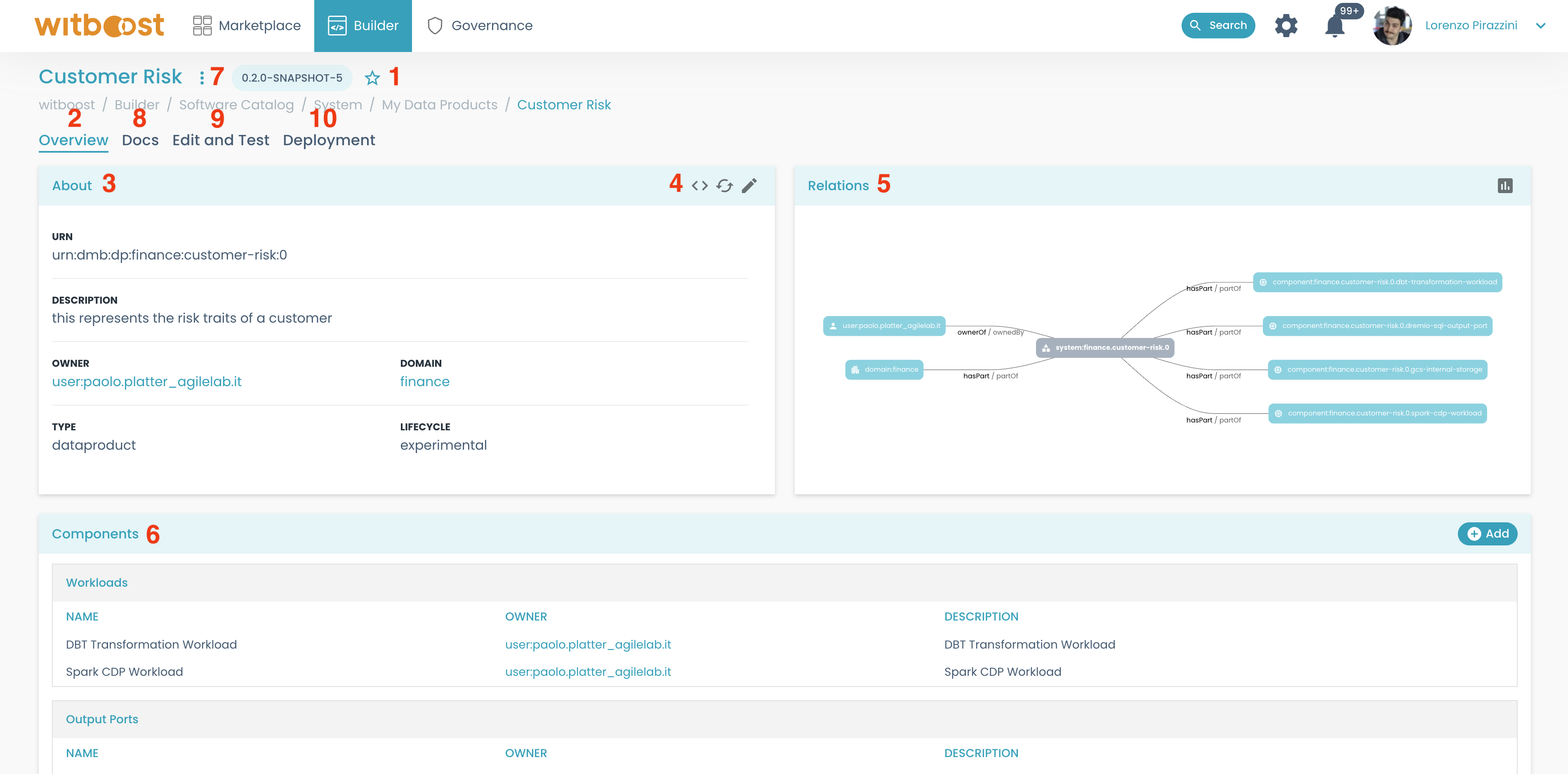
From this page you have full control over the data product; using the previous image as a reference let's see what this page is composed of:
- At the top of the page, you can see the Data Product name, and just below it the breadcrumbs that let you navigate more easily through the various pages.
- The main tab is the
Overview, where you can see the overall details of the data product. The other tabs will show other different aspects of the data product: documentation, edit and test, and deployment. - The
Aboutcard contains general metadata regarding the data product, including the URN that uniquely identifies it. This is the URN that should be used in all the needed references inside the Data Product Descriptor. - From this card, there are also some utility buttons:
- the
<>button opens the repository containing the source code of the data product - the refresh button triggers a refresh of the entity inside Witboost by reading its location again
-
The
Relationscard shows how the data product entity is related to other entities. As introduced, everything is an entity, so in this card, you will see different kinds of relations, depending on the entities connected to it (owned by, part of, etc). -
In the bottom part of the page, you can see all the components that are part of the data product divided into different tables based on their type. By clicking on their name you can open their details page as well. From this card, you also can quickly add new components.
-
The menu with the three dots on the top of the page will let you:
- create a new version of the Data Product. This will create a new branch in all the repositories.
- delete the entity by unregistering it.
- open the
Entity Inspector, where you can see other detailed information regarding the entity and thecatalog-info.yaml(like a JSON and YAML summary)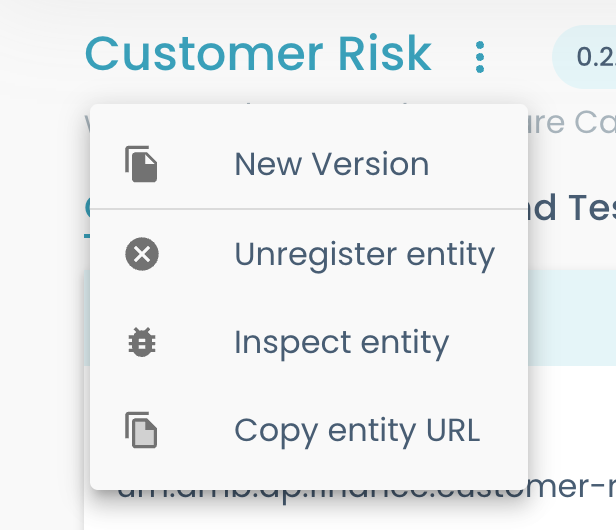
-
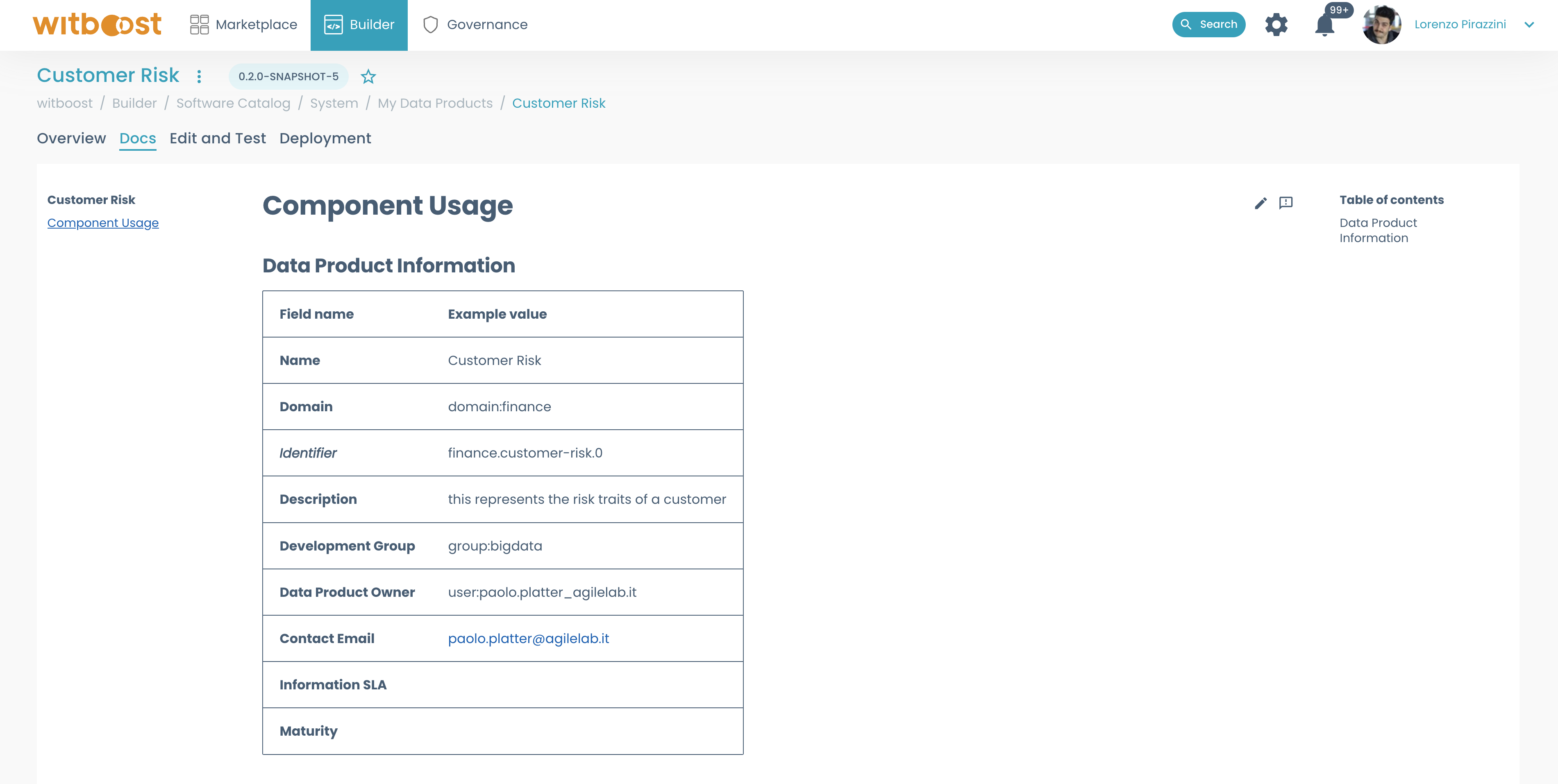
By selecting the docs tab, the techdocs are loaded from the repository (in the "docs" folder) and rendered as a documentation page
-
The next tab is the
Edit and Test, where you can perform operations on the data product like previewing its descriptor, testing it, and creating/updating its draft release.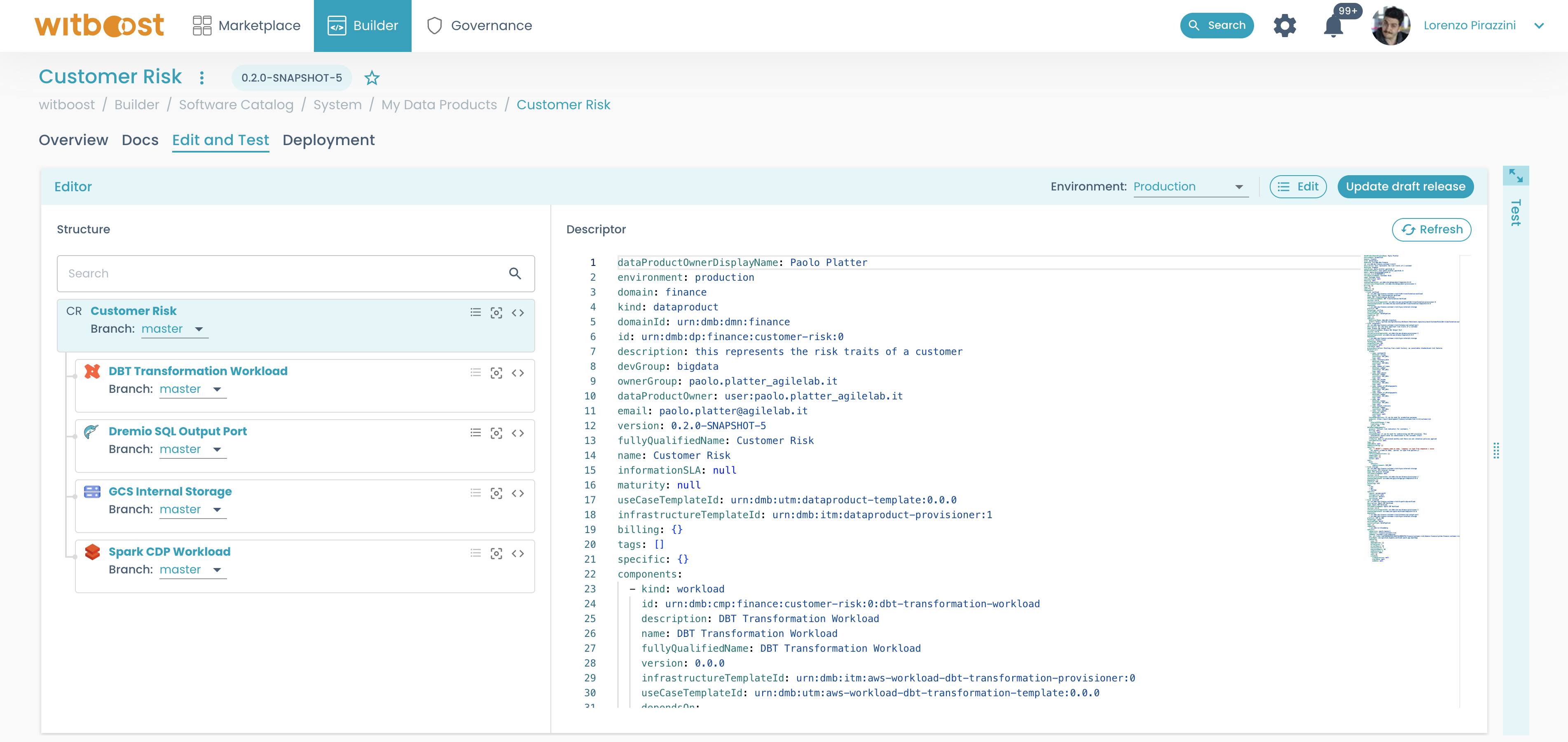
-
The last tab is the
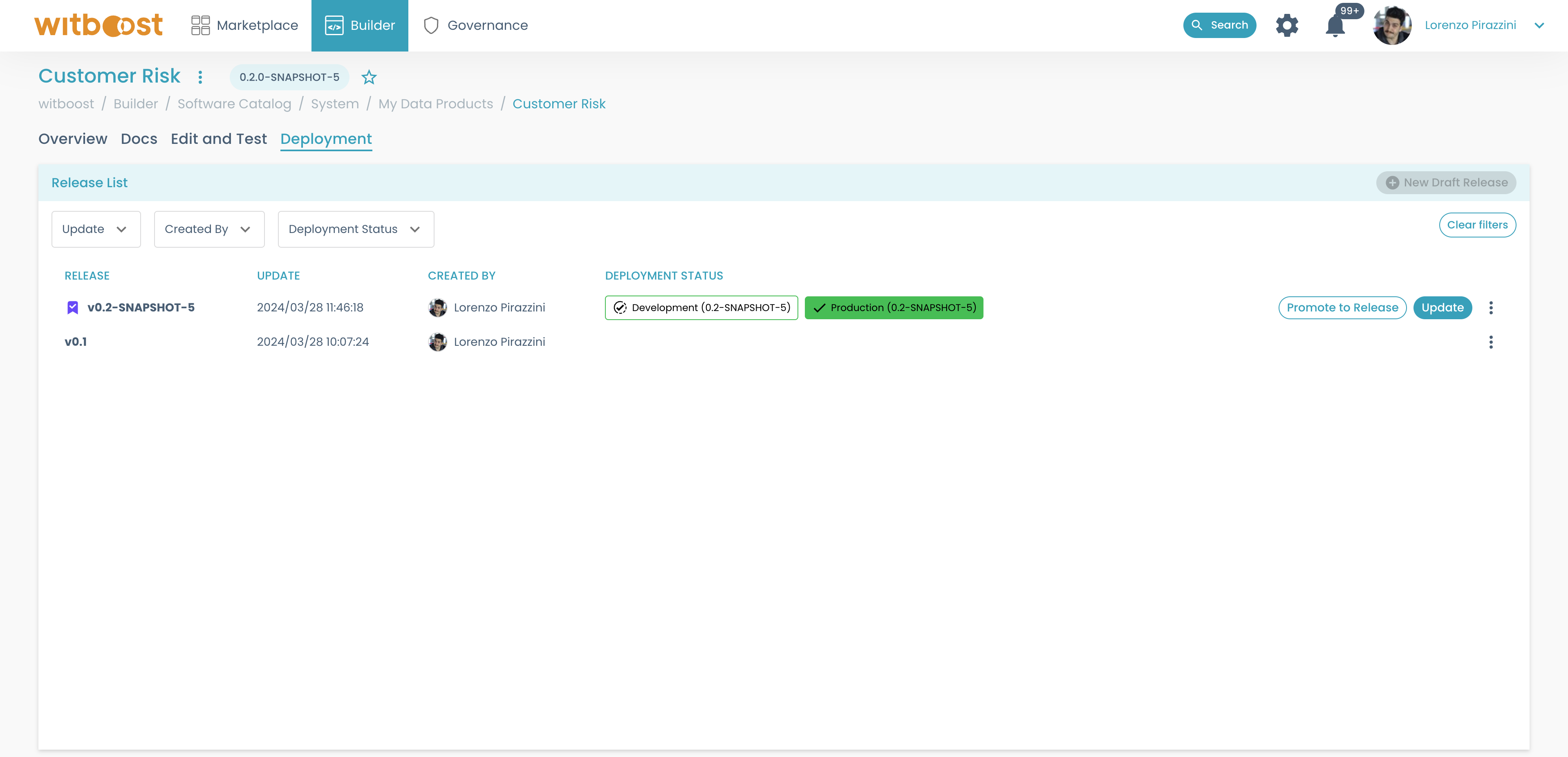
Deploymenttab, where you can check all the releases associated with the data product, and check the deployment status for all the environments.