My Feature Requests
The My Feature Requests page lets you track all Feature Requests you have submitted through the Marketplace, as well as those you have received as a Data Product Owner or delegate.
To access this page:
- Click on your profile picture in the sidebar and select Settings and Profile
- Select the Feature Requests tab
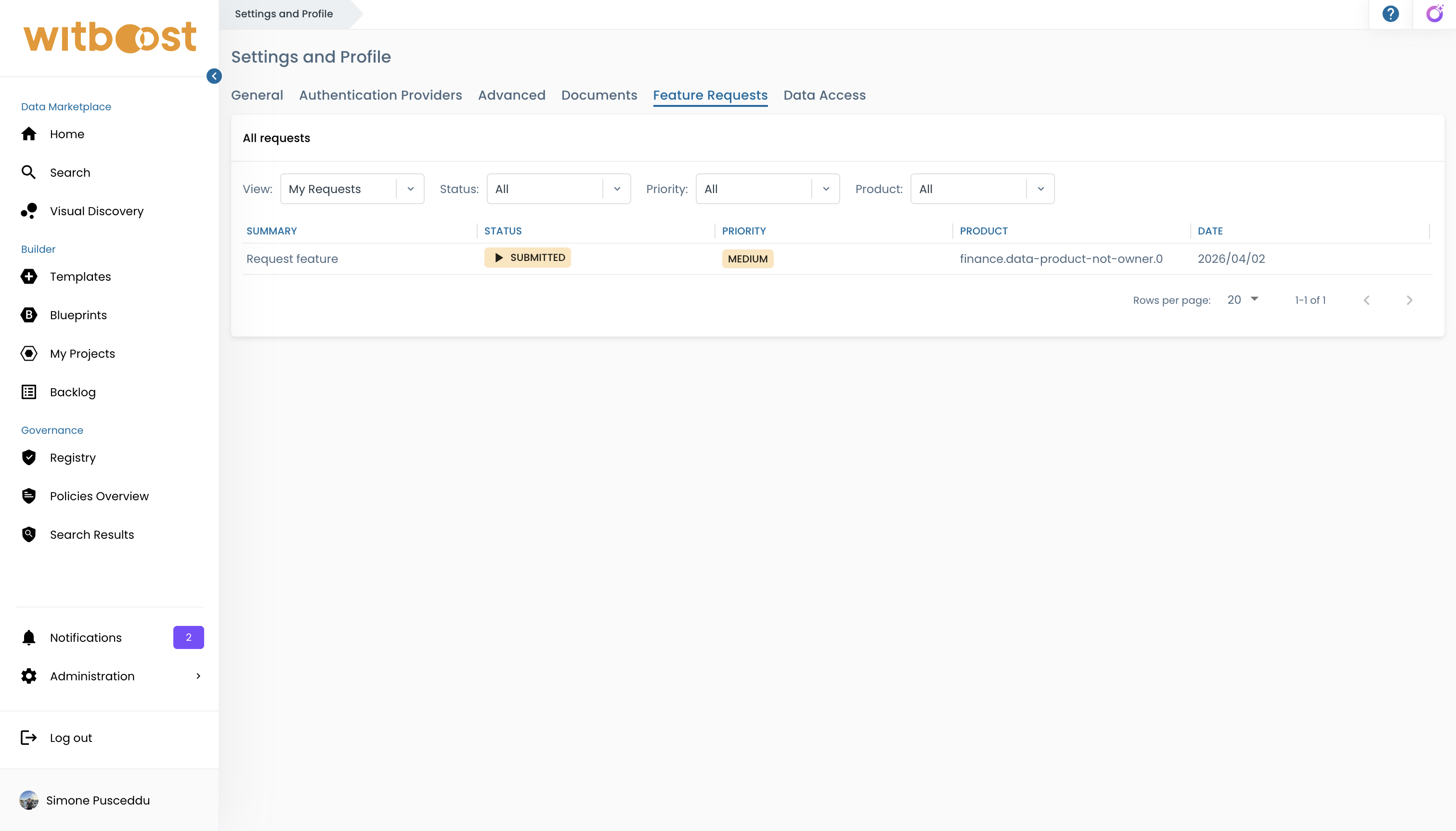
My Requests
The My Requests view lists all Feature Requests you have submitted. For each request you can see:
To learn how to submit a Feature Request, see Feature Request.
- Summary — the title of the request
- Status — current status (Submitted, Approved, In Progress, Implemented, or Rejected)
- Priority — the priority level you assigned
- Product — the target Product
- Created — when the request was submitted
Use the available filters to narrow the list:
- Product — filter by target Product
- Status — filter by request status
- Priority — filter by priority level
Select a request to open its detail view, which shows the full description, target Product and Component (if applicable), timestamps, and any attachments you included. Attachments can be viewed and downloaded from this view.
This view is read-only. Only the Data Product Team can update the status of a Feature Request.
Received
The Received view lists Feature Requests that have been submitted against Products you own. This gives you visibility into what consumers are requesting for your data products.